FDM · FILAMENT PRINTING
A part, from one piece.
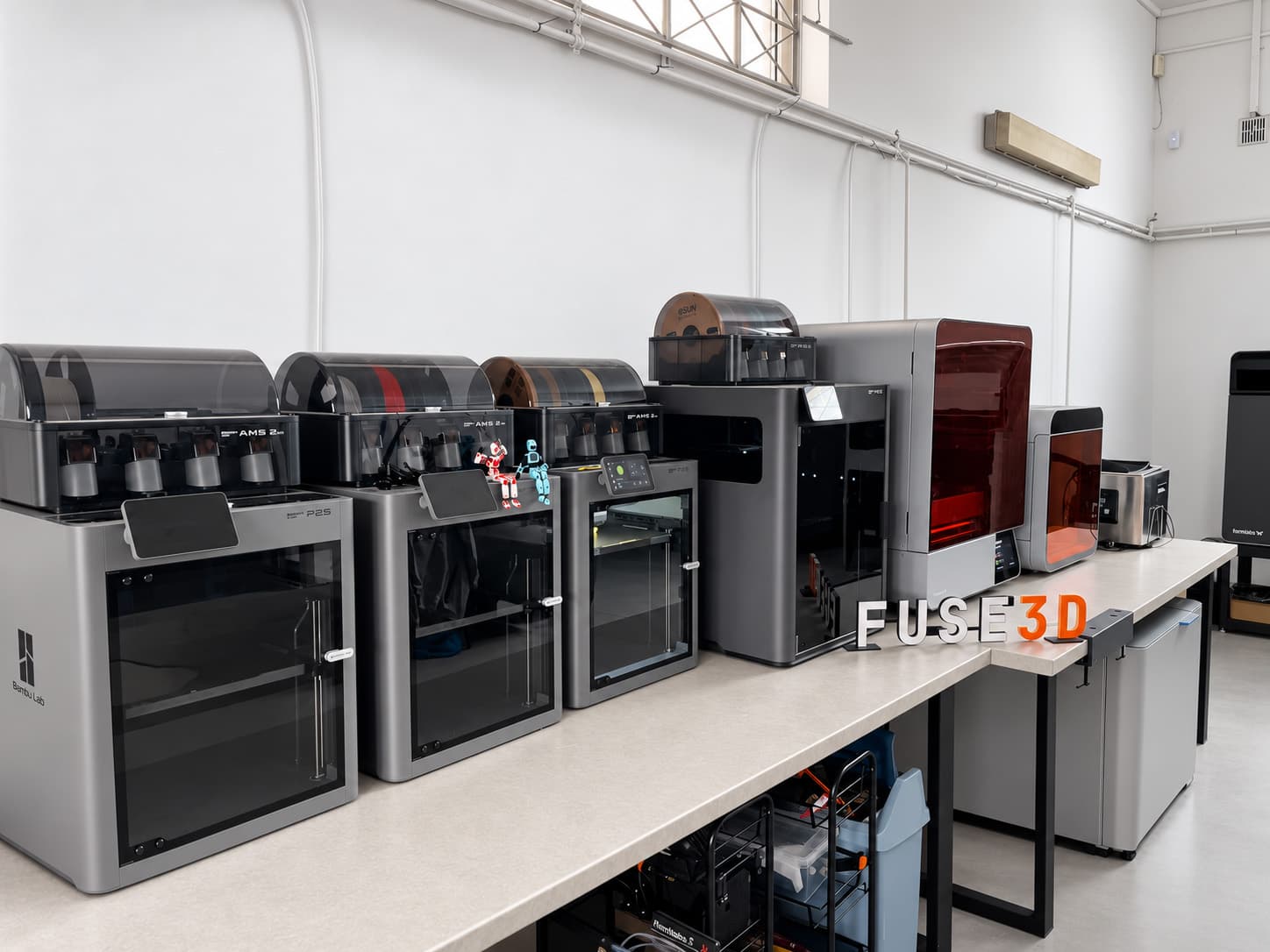
Eight P2S Combos and one H2C AMS Combo print prototypes, usable parts and short runs in our Olsztyn workshop.
No minimum order. No file setup charge.
5–14 business days from order confirmation.
Nine printers, two sizes
FDM · 8 ×
Bambu Lab P2S Combo
- Build volume
- 256 × 256 × 256 mm
- Layer height
- 120–280 µm
FDM · 1 ×
Bambu Lab H2C AMS Combo
- Build volume
- 305 × 320 × 325 mm
- Layer height
- 120–280 µm
Choose a filament for your part
Start with the application. We review operating temperature, loads and the finish you need when selecting a specific filament.
Indicative price in the calculator
PLA
Concept models and shape checks.
For prototypes without elevated operating temperatures.
Quote in this materialPETG
Functional housings and brackets.
A useful starting point for everyday parts.
Quote in this materialABS
Housings and engineering prototypes.
For applications needing impact and heat resistance.
Quote in this materialASA
Outdoor housings and components.
UV resistance helps with exposure to sunlight.
Quote in this materialTPU
Flexible covers and bump stops.
We select hardness and deflection for the application.
Quote in this materialTPU for AMS
Flexible parts with AMS feeding.
A separate TPU variant; we check the flexibility you need.
Quote in this materialPC
Engineering parts exposed to heat.
Selection requires the operating temperature and load.
Quote in this materialPA
Functional nylon parts.
We select the PA grade for operating conditions and humidity.
Quote in this materialPLA-CF
Rigid models and prototypes.
Carbon-fibre PLA retains the heat limitations of PLA.
Quote in this materialPETG-CF
Rigid brackets and housings.
Carbon-fibre PETG for functional parts.
Quote in this material
Other filaments: individual quotation
We select PET, reinforced materials and support filaments for your model. Describe the operating conditions and we will suggest a material and production approach.
PET · PVA · ABS-GF · ASA-CF · PA6-CF · PA6-GF · PAHT-CF · PPA-CF · PET-CF
Ask about a materialOne filament family in up to four colours can be estimated online. Mixed material projects need review.
The online price is indicative. We confirm orientation, supports and the final price after reviewing the model.
Bambu Lab filament comparisonWhat we print in FDM
A prototype for a fit check
Check the size, hole positions and fit before the next design revision.
A bracket or housing
Describe the loads and operating environment. We will select a filament and print orientation.
A short production run
Specify quantities and colours. We will review repeatability and the schedule for the whole order.
Prepare your model for printing
Layers and load direction
FDM leaves visible layers. Indicate visible surfaces and the direction of force so we can select the orientation.
Supports and finish
Overhangs may need supports and their contact areas may need finishing. Mark the surfaces that matter most.
Fit and dimensions
Include critical dimensions and required clearances with the file. For mating parts, start with a trial piece.
From model to finished part
Upload STL or 3MF
Select FDM, filament, colours and quantity. The calculator will show an indicative price.
We confirm production
We review the model, orientation and supports. We confirm the final price and lead time before printing.
Printing and part preparation
After printing, we remove supports and check the parts. We agree the finishing scope at quotation.
Questions about FDM printing
Can I order one piece?
Yes. FDM has no minimum order or file setup charge. The calculator price is indicative and needs confirmation after model review.
Do you print in several colours?
The calculator supports up to four colours of one filament family. We quote combinations of different materials individually after reviewing the model.
What if I do not have a 3D model?
Describe the part and attach a sketch, photos or dimensions in the no-model form. We will agree the scope of model preparation and FDM printing, with their prices confirmed separately.
I do not have a modelWhen should I choose SLS or SLA?
If visible layers, supports or load direction are a concern, compare the technologies or send us your model. We will help select a process for the part.
Have a model? Check the FDM price.
Upload your file and choose a material. If you need help selecting it, leave your contact details alongside.
Get an FDM quote I do not have a modelQuick contact
Don't have a file? Leave your contact details.
Leave your phone number or email. We’ll work out the material and cost.
Loading the form details. Please wait a moment.